
Destroying all Local AI trends
A 744B model, 25 GB of RAM, and one small question: how long until I get my answer? I followed the numbers behind Colibrì, AirLLM and FlexGen.

My laptop would like to see the receipt
I own a 4 GB RTX 3050. Put “70B on a 4 GB GPU” in a headline and you have my full attention. My brain has already filled in the rest: I’ll ask it a coding question, watch the answer scroll by, and feel extremely smug about the GPU I didn’t buy. Funny how I supplied the entire second half of that demo myself.
So I went looking for the detail I’d want before downloading a few hundred gigabytes: how many seconds would I spend waiting for 100 new tokens? I read the projects’ benchmarks for this one. The machine I’ve actually timed myself is my 3050, and I’ll keep those measurements separate.
Why I care where the weights live
For everyday chat, I want the answer to start promptly and keep coming while I read. On my RTX 3050, the fastest practical setup is usually a model whose active weights and attention cache fit in VRAM. Once they’re there, the GPU can read them again for the next token. Load a model from SSD once and I pay during startup. Make the GPU wait on fresh SSD reads for every token and I pay throughout the conversation.
This is the appeal of a Mac Studio or a DGX Spark for local inference. Their GPUs can reach into a large pool of fast unified memory. Apple rates the M3 Ultra Mac Studio at 819 GB/s of memory bandwidth. NVIDIA specifies 128 GB of shared memory at 273 GB/s for the 128 GB Spark. Those are memory specifications. Actual chat speed also depends on the model, quantization, kernels and context. Mac Studio specifications · DGX Spark hardware guide.
My rule for a budget laptop is simple. I try the smallest model that answers my question well, keep as much of its working set close to the GPU as I can, and time a whole reply. Some CPU offload can earn its keep. A setup that spends ten seconds finding the weights for the next token is useless to me halfway through debugging a function.
Colibrì: one cold token can cost eleven gigabytes

My verdict. At the published cold rate, I could spend my whole lunch break waiting for a paragraph. A video of the model answering proves it runs. Editing the wait out of the video would also edit out the part I have to live with.
Colibrì can run GLM-5.2, a 744B mixture-of-experts model, on a WSL2 machine with 25 GB of RAM. The trick is that a token only activates a subset of the experts. The engine can keep frequently used experts close and fetch the others from NVMe. The project lists about 370 GB on disk for its int4 model. Colibrì repository.
The number I circled was about 11 GB of cold disk reads per token. On the original dev box the drive delivered around 1 GB/s. Divide the two and a cold forward pass spends roughly eleven seconds’ worth of drive time just fetching weights. The authors put the cold decode ceiling at 0.05–0.1 tokens/s. If that rate held for 100 tokens, I’d be waiting about 17–33 minutes. That last bit is my arithmetic. Real requests can warm the cache. Colibrì’s reference measurements.
There’s also a 6.84 tokens/s result for a single request. Read the setup beside it: six RTX 5090s, with the experts resident across VRAM and RAM. Borrowing the six-card speed for the 25 GB laptop would be like quoting a relay team’s time on my gym membership application. Six-GPU experiment.
AirLLM: 4 GB tells me the fit, not the wait

My verdict. Four gigabytes gets my card through the door. It tells me nothing about how often the next layer will be waiting on the other side of a storage transfer. Until I see a timed, single-user reply, that badge is useless as a buying guide.
AirLLM’s 70B-on-4-GB claim answers a real engineering question. Split a dense model into layer-sized pieces, bring each piece onto the accelerator for its turn, then reuse that space. Peak GPU memory falls. Generating the next token still takes another trip through the decoder, and each piece that fell out of fast memory has to travel again. AirLLM implementation and examples.
Now read the “up to 3×” claim in the compression section. AirLLM’s authors identify disk loading as their main bottleneck there. Compressing the weights means fewer bytes to move. That can genuinely speed up the streamed run. To predict chat speed on my laptop, I still need the starting rate. Tripling 0.1 tokens/s would leave me at 0.3. That’s an example of the math, not an AirLLM benchmark. AirLLM’s compression claim and configuration.
FlexGen: I only brought one prompt
My verdict. My coding question comes with exactly one customer: me. A throughput record spread across 144 sequences can be valuable for an overnight evaluation and still tell me almost nothing about the pause after I hit Enter.
FlexGen gives me my favorite benchmark footnote. Its authors ran OPT-175B on one 16 GB GPU and reported one generated token per second at an effective batch size of 144. Their goal was to work through a pile of requests that could wait. A batch lets many sequences use a block of weights while it’s already in memory. FlexGen, ICML 2023.
To judge a chat session I need two batch-one measurements: time from pressing Enter to the first token, then the rate at which the rest of my answer arrives.
Where flash really can win
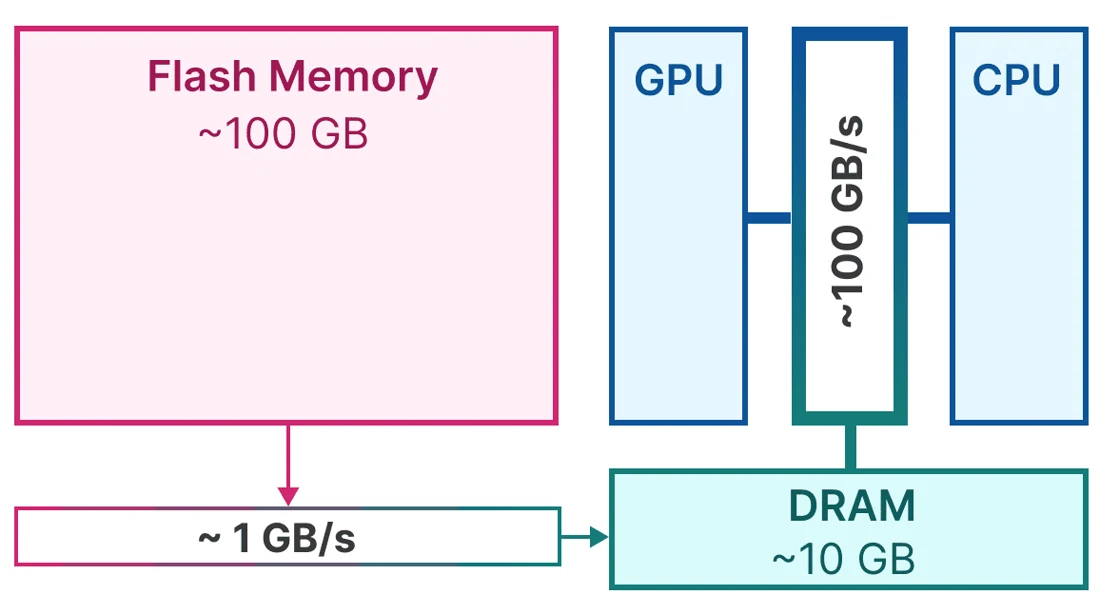
There’s a counterexample worth taking seriously. Apple’s LLM in a Flash researchers reused recently active neurons and arranged related weights into larger contiguous reads. Their approach ran models up to twice the available DRAM and reported 4–5× CPU and 20–25× GPU inference speedups against naïve loading. That baseline is what makes the result intelligible: fewer trips to flash, and more useful bytes per trip. Apple’s paper and results.
For my own text workload I had a cheaper experiment. With Bonsai at 4K context, I measured about 5.15 tokens/s originally and 11.95 after tuning. Changing layer placement and CPU threads got me close to the final number even before I dropped the vision projector. Different model, different test. What made that result useful to me was knowing exactly which laptop would be answering my next prompt. My RTX 3050 measurements.
What I look for before I hit download
- One complete reply. Give me the input length, output length, time to first token and batch-one decode rate. A fast prompt scan can still lead to a painfully slow answer.
- Two cache states. Show me the first run after a cold start and a second run with a different prompt. A repeated prompt can benefit from weights or context already in memory.
- The whole machine. Which GPU, how much system RAM, what drive, and how many bytes actually crossed it? A VRAM figure leaves most of a disk-offload system out of the picture.
- A baseline I can use. Same task, comparable answer quality, same hardware. If a smaller resident model solves my problem, its wall-clock time is the number the bigger model has to beat.
If an engine gets a huge model running on hardware I already own, great. If the pitch is that I should replace my everyday assistant with it, show me one complete answer on that hardware. Until it beats the smaller model on my actual task, the smaller model keeps the job.